
New! Detailed information about your holdings is now at your fingertips
Introducing exciting enhancements to 'My Holdings' - where you find the list of all securities you hold in your portfolio. Now you have quick access to positions, cash detail, portfolio quotes, allocation charts and news regarding your holdings - all in one convenient location.


Click on each My Holdings tab to explore some of the great new features:
Positions tab gives you a clear picture of the performance of your portfolio and the individual investments you hold.
Here you can view your entire portfolio on a single page.
Here you can view your entire portfolio on a single page.
Access detailed information on each of your holdings - including the number of shares you hold, the market value, unrealized gain/loss and the percentage of your portfolio each security represents.
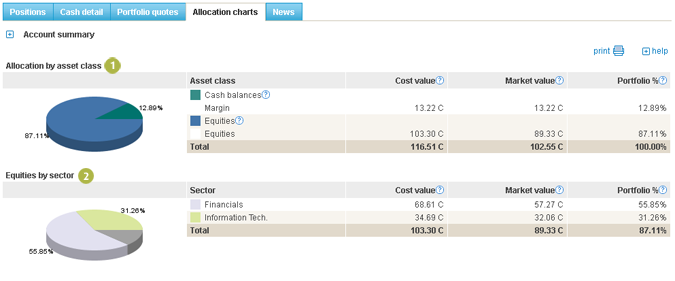
Categorize your holdings by asset class or by settlement currency to view your investments grouped by each currency you hold.
View the sector allocation of your equities by clicking on the Categorize by sector check box.
Totals for Market value, Gain/losses and Portfolio % give you a quick snapshot of your portfolio's performance.
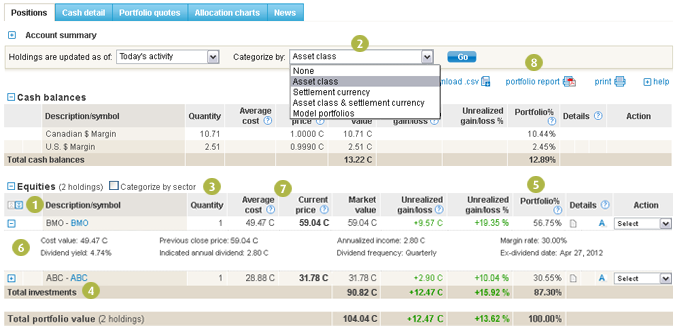
The 'Portfolio %' column lets you see how much of your portfolio is allocated in each security or class. This helps you gain insight into the true diversification of your portfolio.
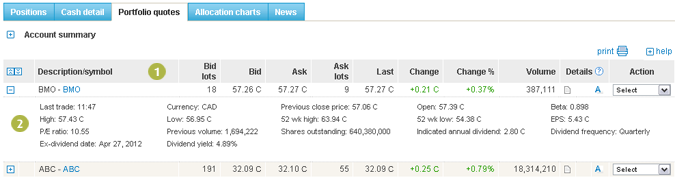
Expanding rows show more details on each security including income, yield, maturity date and more.
Sort your holdings by clicking on the table heading of most columns.
The PDF portfolio report offers an up to date portfolio summary that you can print, save and access offline anytime.